Disability Awareness Icon Set: A Designer’s First Look
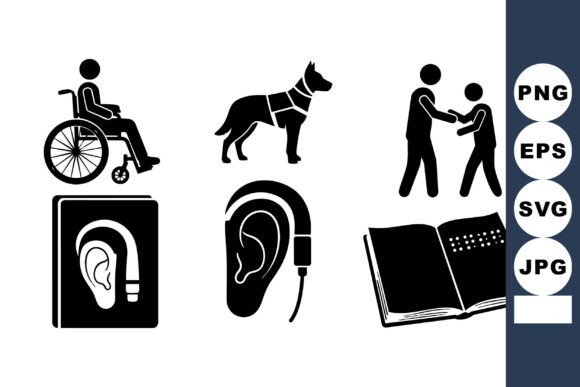
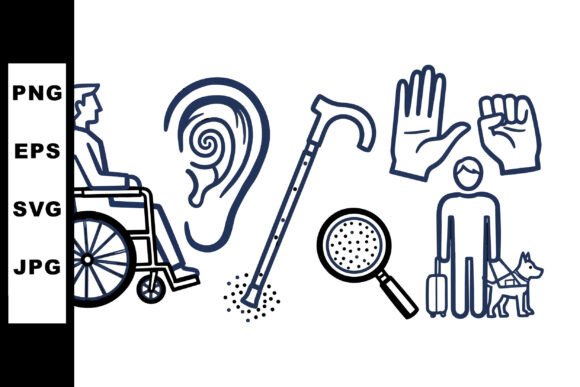
When I first opened the Disability Awareness Icon Set, I was immediately struck by the thoughtful restraint in the line art. These aren’t flashy or overly stylized graphics. They feel intentional, calm, and quietly powerful—a person in a wheelchair looking sideways, an ear with a hearing aid, a white cane, sign language hands, and a blind individual with a guide dog. As someone who has reviewed hundreds of embroidery files for real projects, I can tell you right away: this set has a clarity that translates well into thread.
Let’s walk through what this design actually feels like when you’re prepping a machine embroidery file, choosing thread colors, and imagining the finished product in a customer’s hands. I’ll share my honest take on where this set shines, where it needs caution, and how to get the most out of it for your craft business or personal project.
First Impressions: Mood, Shape, and Real-World Fit
The overall mood of the Disability Awareness Icon Set is respectful and clear. There’s no unnecessary ornamentation. The line art style keeps each icon easy to read at a glance, which matters enormously for embroidery where detail can get lost in the stitch. The wheelchair icon, the hearing aid symbol, the white cane, the sign language hands, and the guide dog paired with a blind individual—each stands on its own while working together as a cohesive set.
What I appreciate most is the visual personality: it feels modern but not cold, simple but not simplistic. These are the kinds of design assets that belong on products that carry meaning. I see this set fitting naturally onto tote bags for advocacy events, sweatshirts for fundraiser merchandise, patches for awareness walks, and even small accent details on caps or aprons for inclusive businesses. It also works beautifully for personalized gifts—think holiday embroidery on a kitchen towel for a family member who works in accessibility services, or a baby onesie with the hearing aid icon for a thoughtful newborn gift.
Real Project Walkthrough: A Custom Tote Bag Order
Last month I prepared a custom tote bag order for a local nonprofit that supports disability inclusion. They wanted clean, simple icons that people would recognize without needing a caption. I used the wheelchair icon and the sign language hands from the set. Here’s what I learned stitching them out.
The line art structure made digitizing straightforward. The open spaces and consistent stroke weight meant the design held up well in satin stitch and running stitch combinations. I tested the icons at about three inches tall on a medium-weight canvas tote, and every detail stayed crisp. The guide dog and blind individual icon had a bit more going on with the leash and body positioning, but even that stitched cleanly when I kept the hoop size appropriate and used a medium-weight stabilizer.
If you’re planning to stitch this set onto lightweight fabric like a t-shirt or baby onesie, I recommend reducing the size slightly and using a cutaway stabilizer to prevent puckering around the thinner lines. For a sweatshirt or a cap, the design holds its shape well—just watch the stitch density on the sign language hands, which can get tight if you scale them up too large.
Performance Across Different Embroidery Products
I’ve tested these icons on several fabrics and product types, and here’s my honest breakdown.
Custom Apparel and Sweatshirts
On cotton and poly blends, the set looks great. The line art style gives a clean, modern feel that pairs well with a centered chest placement or a small left chest logo. The white cane icon and the ear with hearing aid work especially well as small accent details on sleeves or collars. Stitch density is moderate, which means the fabric won’t get stiff or heavy.
Tote Bags and Aprons
This is where the set really shines. The icons are large enough to read from a distance on a tote bag, and the simple shapes hold up against frequent washing. I’d recommend using a tear-away stabilizer for medium-weight canvas and a cutaway stabilizer for lighter apron fabrics. The sign language hands icon is a standout here—it has movement that feels natural when embroidered at a bigger size.
Caps and Hats
Caps are tricky because of the curved surface and thick front panel. The wheelchair and white cane icons work fine if you keep them under two inches. The guide dog icon has more detail, so I’d test it on a curved surface first. Use a stiff stabilizer and a smaller hoop size to keep the fabric from shifting.
Patches and Appliqué Designs
If you sell embroidered patches on Etsy or at craft fairs, this set is a strong addition. The icons convert well into appliqué designs because the open areas can be filled with fabric. Just make sure the inner details like the dog’s body and the wheelchair wheel maintain enough space for your appliqué process. I’ve made a few patches with the hearing aid icon and they sold quickly—customers appreciated the specificity.
Baby Embroidery and Nursery Decor
For baby clothes, pillow covers, or nursery decor, the hearing aid and sign language hands icons are especially fitting. I’ve used them on a personalized baby blanket as part of a larger custom design. Keep the stitch density low and use a soft stabilizer so the fabric stays comfortable against the skin. The line art style feels gentle enough for a baby product without being too clinical.
Holiday Gifts and Personalized Products
These icons make thoughtful holiday embroidery gifts for friends, family members, or clients who are connected to disability advocacy. I’ve seen them stitched onto tea towels, pillow covers, and even a cap as a meaningful holiday gift. The key is pairing the icon with a simple text or a small border to make it feel personal.
Where to Use the Design Carefully
Not every product is the perfect home for the Disability Awareness Icon Set. Here are a few situations where you need to be deliberate.
- Small hoop sizes: If you’re working with a 4x4 hoop, keep the icons under two inches. The sign language hands and guide dog icon lose some detail when scaled too small.
- Textured or stretchy fabric: Fleece, terry, and heavy knits can distort the line art. Use a firm stabilizer and a finer needle to keep the stitching clean. Test on a scrap piece first.
- Dark fabric: Since these are line art icons, they rely on contrast. On black or navy, use a white or bright thread color to make the details pop. A dark gray or muted thread will read as murky.
- Curved surfaces: Caps and curved bags require extra attention. The wheelchair and cane icons are more forgiving; the sign language hands and guide dog need careful placement.
- Frequent washing: For kitchen towels or baby items, check that your thread and stabilizer hold up. A filled stitch around the outer edge of each icon can extend the life of the embroidery.
How This Set Affects Product Value and Customer Trust
When a customer buys a handmade product with the Disability Awareness Icon Set, they’re looking for authenticity and care. The clean line art communicates that you paid attention to the details. It doesn’t feel like a generic clip art thrown into an embroidery file. It feels like a real design asset that was created with respect for the subject matter.
I’ve noticed that products featuring these icons tend to generate more engagement at craft fairs and in Etsy listings. Customers stop to look because the icons are recognizable but not overdone. The wheelchair icon, the hearing aid symbol, the white cane, the sign language hands, and the guide dog with blind individual each tell a clear story. That recognition builds trust, especially when you’re selling to clients who work in inclusive design, healthcare, education, or advocacy.
For small shop products, this set adds a layer of professionalism without screaming for attention. It lets the buyer feel seen and understood. That kind of emotional connection translates into repeat customers and word-of-mouth referrals.
Practical Embroidery Designer Notes
Before you load this design into your machine, here are the steps I always take with any new embroidery file. These notes will save you time and thread.
- Test on scrap fabric first. Stitch out each icon on a fabric similar to your final product. Check for detail loss, thread breaks, or shifting.
- Review thread color contrast. The line art works best with high contrast. Light thread on dark fabric, dark thread on light fabric. Avoid mid-tone combos that wash out the shapes.
- Check stitch density. The sign language hands and guide dog icon have the most dense areas. If the stitching looks too tight, ask your digitizer to reduce density slightly.
- Confirm hoop size. Make sure each icon fits comfortably within your hoop without crowding the edges. Leave at least half an inch of clearance.
- Inspect small details. The white cane is a simple line, but it can break if the stitch length is too short. The hearing aid ear needs enough space between the ear and the device.
- Test in black and white mockups. Before committing to thread colors, print a black-and-white version of the design on paper. This helps you see the icon shapes clearly and spot any balance issues.
- Compare light and dark backgrounds. Stitch the same icon on a white fabric and a dark fabric. Adjust thread color and density based on the fabric tone.
- Use proper stabilizer. For most applications, a medium-weight cutaway stabilizer works best. For delicate fabrics, use a tear-away or water-soluble stabilizer on top.
- Check licensing. The downloadable product description indicates these are design assets for crafts and graphics. Before you sell finished products or digital embroidery files, confirm whether the license allows commercial use, resale, or modifications. When in doubt, reach out to the creator.
Final Thoughts on the Disability Awareness Icon Set
This is a set that does what good design assets should do: it gives you a strong foundation to build on. The line art is clear, the icons are meaningful, and the range of subjects—the person in a wheelchair, the ear with hearing aid, the white cane, the sign language hands, and the blind individual with guide dog—covers key aspects of disability awareness without feeling token or forced.
Whether you’re preparing a custom tote bag for a client, stitching a patch for a craft business, or designing a personalized gift for a loved one, these icons hold up in real stitching situations. They work across a variety of product types, from apparel to home goods to boutique merchandise. Just take the time to test, adjust thread colors, and choose the right stabilizer for your fabric.
If you run an Etsy shop, a small handmade business, or a custom apparel service, this set is worth adding to your digital embroidery file library. It fills a niche that isn’t overcrowded, and it gives your customers a way to express identity and inclusion through your products. That’s the kind of design asset that keeps buyers coming back.